This article applies specifically to organizations using the HRIS Sync integration. |
Overview
To authenticate Sage HR using an API key, you will need to provide the following information:
- Subdomain
- API Key
This guide will walk you through finding your subdomain and API key within Sage HR.
Prerequisites
Please ensure you fulfill all the requirements to set up the integration:
Examples:
- You have Administrator or Manager permissions in your company's Sage HR instance or someone has shared their access with you.
Instructions
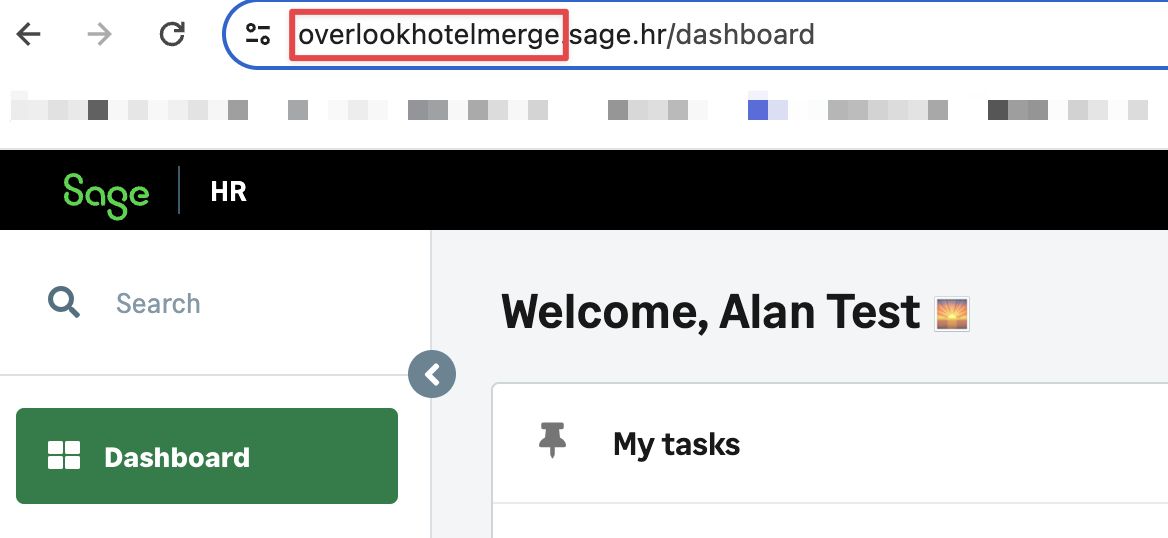
Step 1: Find the subdomain address for your Sage HR account
In the example below the subdomain is overlookhotel
Step 2: Find your Sage HR API key
- Log in and click on your name in the top right corner, and select Settings in the drop-down menu
- Click on Integrations in the left-hand menu, and select API in the drop-down menu
- Copy the API key
Step 2: Enter the subdomain and API key into the linking flow
- Enter your subdomain into the linking flow
- Enter your API key into the linking flow