| This article applies specifically to organizations using the HRIS Sync integration. |
Overview
To authenticate Sage HR or Sage People using an API key, you will need to provide the following information:
- Subdomain
- API Key
This guide will walk you through finding your subdomain and API key within Sage HR or Sage People.
Prerequisites
Please ensure you fulfill all the requirements to set up the integration:
Examples:
- You have Administrator or Manager permissions in your company's Sage HR instance or someone has shared their access with you.
Instructions
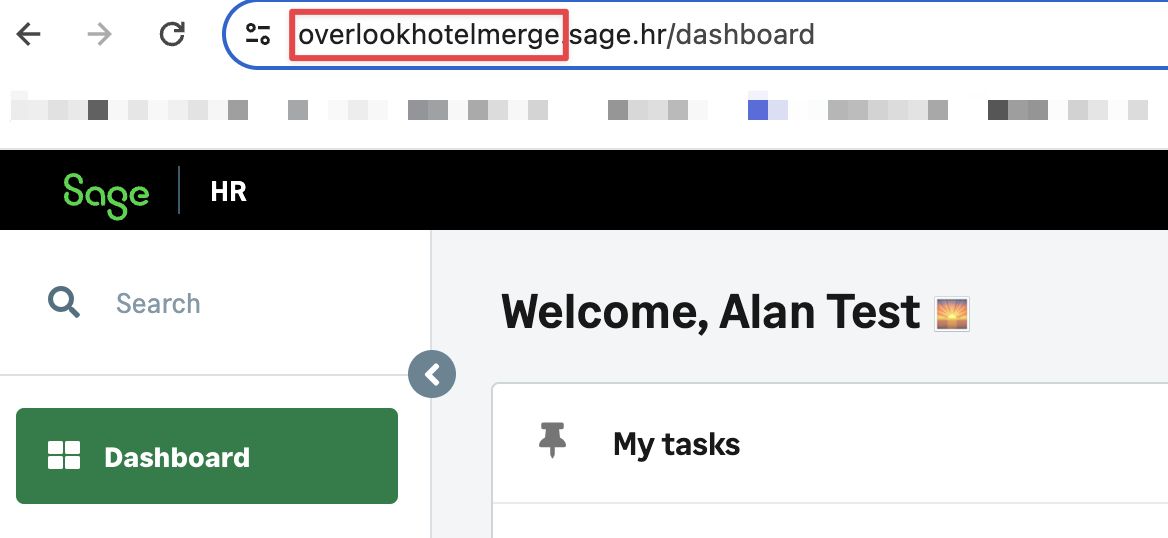
Step 1: Find the subdomain address for your Sage HR or Sage People account
In the example below the subdomain is overlookhotel
Step 2: Find your Sage HR or Sage People API key
- Log in and click on your name in the top right corner, and select Settings in the drop-down menu
- Click on Integrations in the left-hand menu, and select API in the drop-down menu
- Copy the API key
Step 3: Enter the subdomain and API key into the ContactMonkey linking flow
- Navigate to ContactMonkey Settings > Integrations
- Configure the HRIS Sync
- Find and select either the Sage HR or Sage People integration inside of the modal.
- Find and select either the Sage HR or Sage People integration inside of the modal.
- Enter your subdomain into the linking flow
- Enter your API key into the linking flow